Contents
Introduction to Home Page Content
Artena allows the user to add content to the home page. There are two options to populating this content:
- Via the Security Administrator Content
- Via Artena > System Manger > Home Page Content.
Where there is content in both areas the Artena home page content will display on the front page of Artena.
Setup Access in the Security Administrator
Security must be configured in one of the following areas to allow the Home Page Content to be maintained.
Artena
system
- system.systemManager
- system.systemManager.homePageContentEditor – Lets user change home page content.
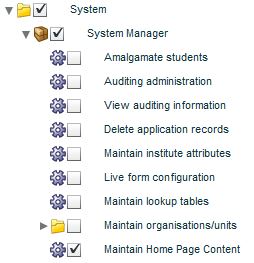
Security Administrator
security – Lets user run Security Administration tool
- security.systemAdmin – Lets user control non-user aspects of functionality in Security AdministratorLets user control non-user aspects of functionality in Security Administrator
