When it has been identified that a student or enquirer has been entered into Artena more than once it is possible to Amalgamate the records using the Amalgamate Student function in System Manager.
Use these steps to amalgamate two records.
1
Select System > System Manager
2
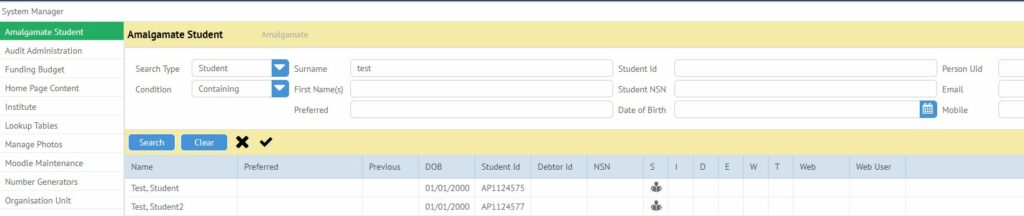
Under System Manager, click Amalgamate Student
3
Select each Search button to:
- Locate the record you wish to retain
- Locate the record you wish to remove
Result: You are taken to the Amalgamate Student Search Screen to match a person. Locate the person and click Match Person.
4
Complete the Checklist by clicking the tick box beside each item once you are satisfied you have completed the requirement.
Has the correct bio-data been recorded in the record to be retained? For example Name, Address, ethnicity, school results, other qualifications etc. | |
Has the correct student photo, if any, been recorded in the record to be retained? | |
If there is a staff record, is that record associated to the record that is to be retained? | |
If there are academic records, have these been moved from the student to be removed and associated with the student to be retained? | |
If one student is a debtor, then both students should be debtors. | |
Have you removed the NSN from the student to be removed? | |
If both students are enrolled in the same course of study, have you withdrawn the enrolment on the student to be removed? | |
Is the student to be retained enrolled in the appropriate Classes, if any? | |
Attendance records, excluding individual attendance records, for the removed student will not be available anymore. If needed, it should be exported and manually recaptured for the retained student. |
5
Click Amalgamate Student.
Result: The records will be amalgamated.