Finance
AR-1223 Batch Payments
Updated the process so that when creating a manual payment through the batch payment process, the payment amount is automatically populated with the amount outstanding on the invoice selected and can be updated if required.
Prescribed
AR-1225 Validation Error
Updated the behaviour for the INTERNALID + REPORTINGYEAR + OTVERSION so they are saved to the correct fields when offered from prescribed to offered.
Note: There is a known issue with the validation error no longer listing the specific OTC or OTE that are not unique, this will be addressed in the next release.
SDR
AR-1228 Funding Source
Updated and added funding sources:
| Keyfield | Old Funding Text | New Funding Text | NZQFMIN | NZQFMAX | AGEMAX |
| 01 | Student Achievement Component (SAC) Funding | Delivery at NZQF levels 7 (degree) and above (DQ7+) (formerly known as Student Achievement Component (SAC) Funding) | 7 | ||
| 11 | ITO Off Job Training | Off Job Training Delivery at NZQCF levels 1 to 7 (non-degree) (formerly known as ITO Off Job Training) | |||
| 26 | SAC Level 1 & 2 Plan Process Funding | Delivery at NZQCF Levels 1 and 2 (DQ1-2) (formerly known as SAC Level 1 & 2 Plan Process Funding) | |||
| 37 | – | Non-degree Delivery at Levels 3-7 on the NZQCF (DQ3-7) | 3 | 7 | |
| 22 | Youth Guarantee Scheme | – | 25 |
Note 1: The introduction of a new funding source, 37, and a change in description to funding source 01 means you will need to update the funding source for existing enrolments where required. These changes will not automatically change the funding source for your existing enrolled students. Sites requiring a data fix for these records please can you provide the requirements to identify which records to change.
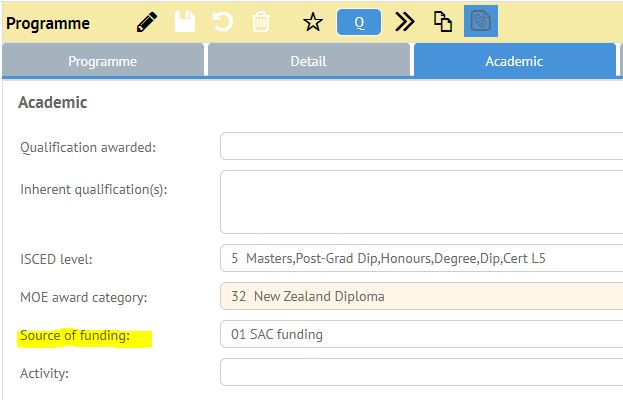
Note 2: Sites need to update the Prescribed Teaching Source of Funding where required:
- Navigate to Teaching Structures > Prescribed > Programme/Level
- Click the Academic tab
- Update the Source of funding.
AR-1230 Validations
Updated SDR validations:
Error Code | Displayed error message | SDR field name | Error type | Description of change |
027 | CATEGORY is Z and FUNDING is 01, 11, 22, 24, 27, 28, 29 or 37 | CATEGORY | Error | Now includes SoF 11 and 37 |
603 | ASSIST is 08 and FUNDING is not 01, 11, 12, 23, 25, 26, 27, 30, 32, 33, 35, 36 or 37 | ASSIST | Error | Now includes SoF 11 and 37 |
604 | ASSIST is 13 and FUNDING is not 01, 11, 22, 25, 26, 27, 30, 32, 33 or 37 | ASSIST | Error | Now includes SoF 11 and 37 |
645 | MANAAPPR is Y and FUNDING is not 01, 02, 03, or 37 | MANAAPPR | Error | Now includes SoF 37 |
629 | If FUNDING = 22, student must have not reached their 20th birthday (if course start <= 2022) or 25th birthday (if course start >= 2023) at the time of the earliest course start date of the qualification being funded by Youth Guarantee | FUNDING | Error | Youth Guarantee: Validation changed to extend the YG age limit. |
Send all communications to support@adaptitnz.zendesk.com or phone (0800 543 070 and follow the prompts for Artena).