Enter Title and link accordingly
Enter Title and link accordingly
Contents
Introduction to Academic Records
Academic records are used in Artena to capture details of students’ academic progress. An academic record is created and maintained for each programme, level and stage towards which a student is working.
Academic records contain results that have been awarded to a student:
as a result of course and unit enrolments
as a credit for prior study or experience
as cross-credits.
The Academic Records module deals with all the academic records maintained by your tertiary education organisation. It automatically creates academic records for enrolled students, and provides screens where you can add, view or edit results as the student progresses through a programme of study. It also provides functions which enable you to import results from spreadsheets, send result slips to students and export formal results to NZQA.
Types of Academic Records
Academic records enable you to record and monitor a person’s academic progress through your organisation. They are created and maintained at two levels:
programme, level or stage
study contract component (SCC) and miscellaneous.
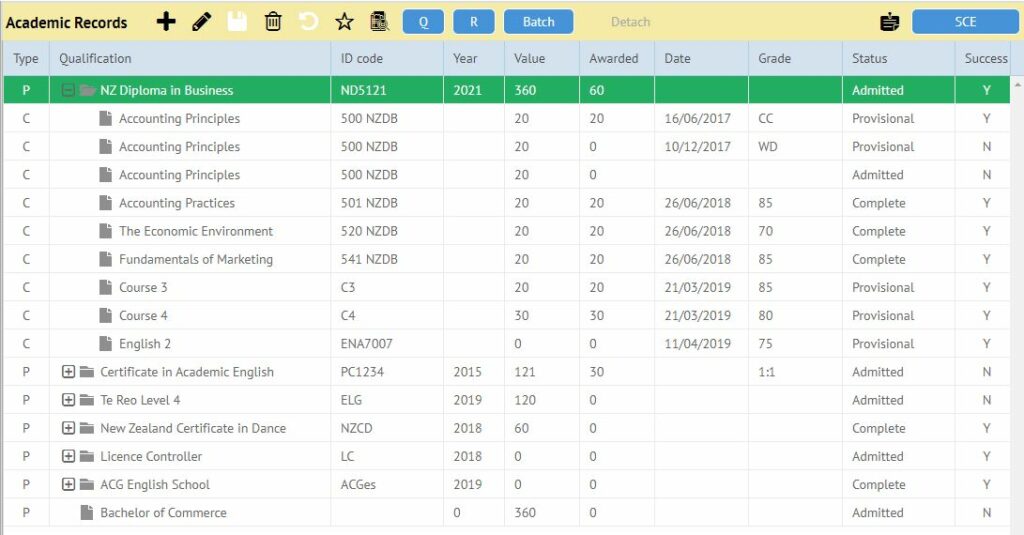
SCC and miscellaneous academic records are linked to the programme, level or stage academic record to provide a complete profile of the student’s achievements, as shown below.
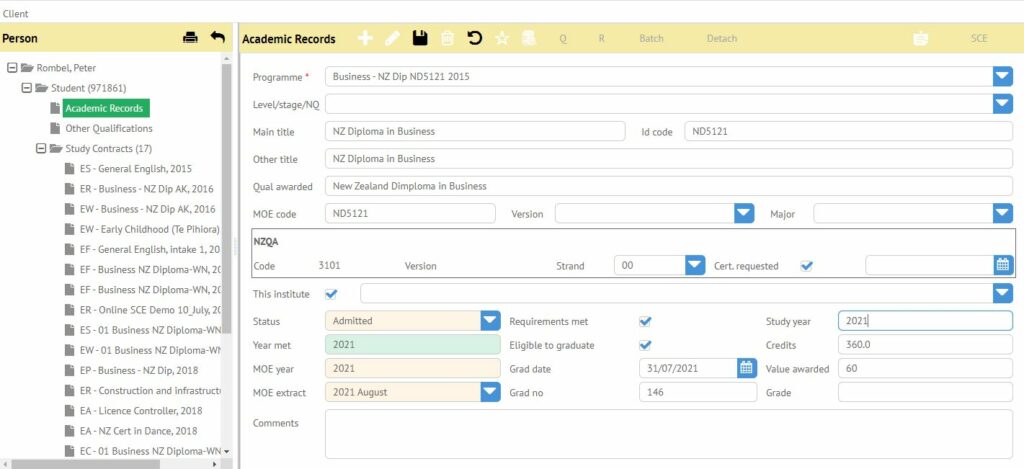
About programme, level or stage academic records
Programme, level or stage academic records are created for each separate qualification or study goal towards which a student is working. They record students’ progress towards these goals by linking the various SCC and Miscellaneous academic records, which carry contributing credits.
A programme, level or stage academic record will correspond to a programme or level/stage entry in the Prescribed Teaching (PT) register. These academic records are created automatically from details of the programme, level or stage in the PT register, but you can also create them manually.
You may wish to do this:
when a student is simultaneously working towards more than one qualification
for tracking a student’s progress through related study elements which can be passed or failed as a whole, e.g. a year of study, where the pass or fail is independent of the results of specific components
for qualifications not offered by your institute, e.g. where a student has enrolled at your organisation to gain missing credits for a qualification begun elsewhere.
Information held includes:
programme(s), levels or stages in which the student is or has been enrolled, or towards which the student has been awarded credits
results required and achieved
graduation eligibility and graduation number.
For more details, see Create or maintain programme, level or stage academic record
About SCC academic records
Study contract component (SCC) academic records are created for each component in which a student is enrolled, i.e. each course or unit. They record the grade(s) achieved by the student in the various SCCs.
Artena automatically creates SCC academic records when the study contract reaches the status of Enrolment Accepted (EA).
Each SCC academic record is attached to the programme, level or stage record to which the results contribute.
Information held includes:
the SCC which is the source of the grade
the grade achieved.
For more details, see Create or maintain SCC or miscellaneous academic record
About miscellaneous academic records
Miscellaneous academic records are similar to SCC academic records, but are used to record results which were not awarded in relation to a SCC, but which nevertheless contribute to the student’s progress towards the qualification or study goal represented by the programme, level or stage record.
Miscellaneous academic records record credits granted to a student for:
study towards a different qualification at this or a different organisation (cross credits)
RPL (recognition of prior learning)
advanced standing, e.g. work experience in a related field.
Miscellaneous academic records must be created manually and attached, via the appropriate programme, level or stage record, to the qualification or study goal towards which the results contribute.
Information held includes:
the source of the grade, e.g. cross credit, RPL, advanced standing
the grade achieved.
For more details, see Create or maintain SCC or miscellaneous academic record.
Process Academic Records
The operation of the Academic Records module is flexible. Within your organisation, its processing and interaction with the other Artena processes will largely be controlled by the settings established within the various system tables.
About Academic Records Status and Sub-status
States are predefined within Artena. They are used to mark and control the processing of academic records. This table explains the possible states for academic records.
Status Use Notes and Rules A Admitted Set by the system when an academic record is created. The initial state for an academic record. P Provisional Set by the system when the result is entered. Provisional academic records can be edited and deleted. R Ready to Release Set by the user when the academic record is ready for results notification. - Before accepting this status, the system can check for outstanding invoices associated with the study contract and warn the user if any are found.
- Records with this status cannot be edited or deleted.
- Depending on the report set up, results may not be printed until the record has reached this state.
Z Complete Set by the user when the record can be notified to NZQA. - Records with this status cannot be edited or deleted.
- The state of the SCC must be either Enrolment Complete or Enrolment Withdrawn.
- Before accepting this status, the system can check for outstanding invoices associated with the study contract and warn the user if any are found.
- Complete records can be reset to Provisional or Ready to Release.
- When the student has been successful and the state of the academic record is set to Complete, the appropriate number of credits will be added to the programme, level or stage record as appropriate.
- Students whose SWArtena account record them as an existing student may view their academic records with this status.
Sub-statuses are defined by your organisation to meet specialist reporting and recording needs. See the Introduction to Lookup tables.
Processing Academic Records
Step | Description |
|---|---|
Create academic record (status A) |
|
Edit academic record details (status A) | You can edit academic records, if required. |
Record grades (status P) | Following students’ assessments, you can:
|
Set status to R | Once results have been recorded, you can manually set the state to R (Ready to Release) or Z (Complete). |
Print reports for sign-off by academic staff (reset status to A or P to edit) |
|
Print result slips | Print result slips for students. |
Set status to Z | You must manually set the status to Z (Complete) when the record can be notified to the NZQA. |
Export results to NZQA | Transfer the results to NZQA. |
Access Academic Records
There are two methods of accessing the Academic Records module. The method that you select will depend on your starting point within Artena and the task you want to perform. The two methods are:
via the student record
via the AR dashboard
Instructions for each access method follows.
Access Academic Records Via Student Record
This method lets you access the Academic Records screen from the Student area. Use this when:
you want to work with programme, level or stage records
you want an overview of a person’s progress through a specific qualification or year of study
you want to enter a student’s academic results in bulk.
See:
View student’s academic progress
Create or maintain programme, level or stage academic record
Create or maintain SCC or miscellaneous academic record
Access Academic Records Via the AR Dashboard
This method lets you access academic records via the Academic Records (AR) Dashboard. Use this when:
you want to enter students’ academic results in bulk
you want to work with the academic records associated with a given Offered Teaching Entry (OTE), Offered Teaching Component (OTC) or class.
See Create or maintain academic records via AR dashboard
Import and Export NZQA Files
The New Zealand Qualifications Authority (NZQA) deals with unit standards as they relate to each student’s record of achievement in an educational organisation. Unit standards are a national recognition of achievement in any given skill or group of skills.
Exporting
NZQA maintains a central database where records of skills are held. When a student at your organisation achieves a particular skill as part of a course, those results are sent to the NZQA database. On request, NZQA sends a certificate as a recognition of that achievement, usually to the tertiary education organisation for presentation at a graduation ceremony.
To export academic records to NZQA, see Export academic records to NZQA
Importing
To match student’s academic achievements with NZQA unit standards, the NZQA Framework units and accreditation files for your organisation need to be imported into Artena.
These files determine the credit value for units and whether or not your organisation is accredited to teach the unit.
To import NZQA Framework units and accreditation files, see Import NZQA data.
Import and Export Academic Records
Exporting
Exporting academic records allows a Teaching Administrator to process student records to calculate results in a spreadsheet as a batch.
Academic records can be exported for all Offered Teaching Components (OTCs) which belong to a particular Offered Teaching Entry (OTE), or for a cohort or class within the OTE or OTC.
The resulting file(s) exported from Artena are tab-delimited text files that can be opened and modified within any spreadsheet application, such as Microsoft Excel or OpenOffice Calc.
To export academic records, see Export academic records to NZQA.
Importing
Importing the academic records back into Artena allows the Teaching Administrator to process results in a batch, instead of editing and inputting each result individually.
Results for an exported OTC, cohort or class can be updated in a spreadsheet application and then the modified file is imported back into Artena. Results can also be imported from a third-party software package, e.g. A++.
To import academic records, see Import NZQA data.