Contents
Introduction to Covid-19 Vaccination Status
My Vaccine Pass is an official record of a person’s COVID-19 vaccination status, it is the only permitted way of verifying students’ vaccination status. Each tertiary education organisation will determine their own process to verify My Vaccine Passes. Secondary students at tertiary education organisations accessing their learning do not require proof of vaccination.
Following verification, storing the My Vaccine Pass itself is prohibited. Vaccination verification information (i.e. whether vaccination has been verified or the date) may be stored as part of students’ records, consistent with the Privacy Act 2020 obligations around the collection, storage, and use. It is important that TEOs explain why the information is being collected, what it will be used for (i.e. to comply with the relevant requirement), and importantly, what are the consequences if they do not provide the information.
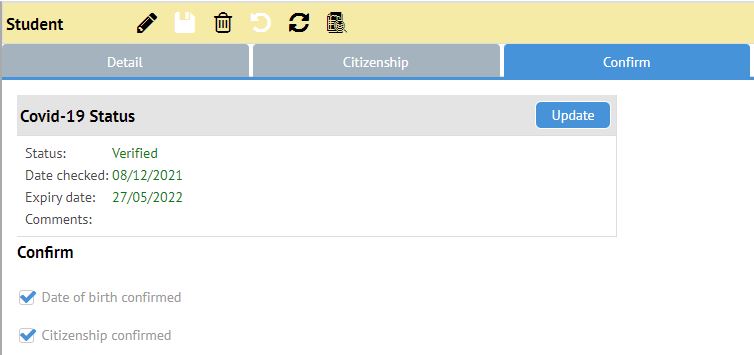
In Artena this information is stored in the Support Services/Health module and can be entered and viewed via the Support Services/Health module or from the Student/Confirm tab.
Setup Access in the Security Administrator
The following security function must be configured to give access to view and record My vaccination pass.
client.person.student – Lets the user look at student details. Sub-operations extend the functionality. Data security may restrict what they can see or edit.
- client.person.student.data
- client.person.student.data.confirm
- client.person.student.data.covidpassport – Covid Passport information
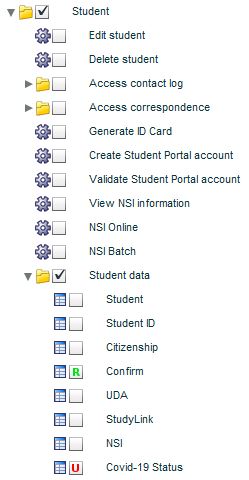
client.person.student – Lets the user look at student details. Sub-operations extend the functionality. Data security may restrict what they can see or edit.
- client.person.student.supportServices
- client.person.student.supportServices.viewHealth
- client.person.student.supportServices.maintainHealth
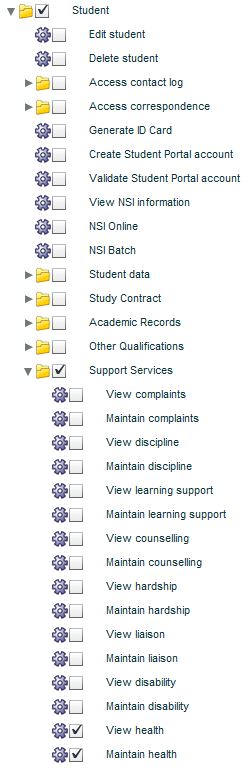
Standard Reports
The following standard reports are available:
- Client\Person\Student\Covid-19 Vaccination Status by Student
- Client\Person\Student\Covid-19 Vaccination Passport History by Student
Record a Student’s Vaccination Status
Use these steps to manually add a record for the student’s vaccination status in Artena.
1
Navigate to Client > Person > Student
2
Click the Confirm tab.
3
Click Update for Covid-19 Status.
Result: The Add Covid-19 Status screen is available.
4
Complete the required fields:
* indicates mandatory fields.
Field
Description
Status *
Click to select the status. The possible values are:
- Verified
- Unverified
- Exempt Secondary Student
- Exempt Medical Reasons
Date Checked *
The date defaults to the current date but can be edited to record the date the record was created.
Expiry Date
The date defaults to the current date but can be edited to record the date the vaccination passport expires.
Notes
Type any information required.
5
Click Save to record the information.
Result: The information is saved to the Student > Confirm tab. It also displays in the grid on the Support Services > Health tab.
Next Step
After recording a student’s Covid-19 status, you can:
Add a contact log for the event. See Maintain contact log for person