Language tests will most commonly assess the English language proficiency of non-native English speakers. Artena allows the capture of results for the following international language proficiency tests undertaken by students:
- Cambridge English Assessment
- IESOL
- International English Language Testing System (IELTS)
- NZCEL
- PTE Academic
- Test of English as a Foreign Language Internet-based Test (TOEFL iBT)
- Test of English as a Foreign Language Paper-based Test (TOEFL PBT)
- Test of English for International Communication (TOEIC)
- Occupational English Test (OET)
- Generic internal test type
Setup Access in the Security Administrator
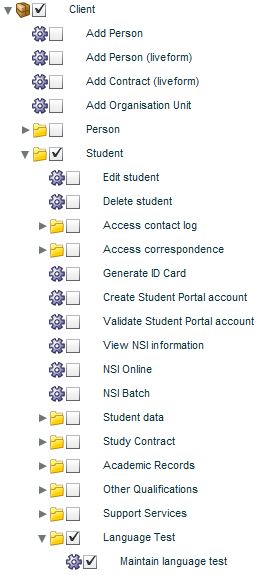
The following security must be configured to maintain Language Proficiency Tests.
client.person – Enables person search, and is required for any user that works with person, student or enquirer information directly.
- client.person.student – Lets the user look at student details. Sub-operations extend the functionality. Data security may restrict what they can see or edit.
- client.person.student.languagetest – Language tests
- client.person.student.languagetest.maintain – Lets the user add, edit, and delete language tests
- client.person.student.languagetest – Language tests
1
Navigate to Client > Person
2
Search for the person record and double click on the person’s name to open the record. See Create or maintain person record
3
Select the Student role and navigate to the Language tab.
Result: The Language Tests screen opens showing already captured tests and selecting the Results tab will show the selected test results captured.
4
In the Language Tests screen, click Add to add a new test and complete:
Field | Description |
|---|---|
Test Type | Click the dropdown list to select the test type taken, eg. Cambridge English Assessment, City and Guilds IESOL, IELTS, NZCEL, PTE Academic, TOEFL, TOEIC, OET, Internal. This will show the rest of the fields and determine the rules for the component results.
|
Test Centre | Click the dropdown to select the test centre. |
Test Date | Type or use the date picket to select the date the test was completed, in DD/MM/YYYY format. |
Expiry Date | Type or use the date picket to select the expiry date of the test results, in DD/MM/YYYY format. |
Listening Component Result / Listening Result | Type the International English Language Testing System result for proficiency with listening. |
Reference No | Type a reference number |
Place of Entry | Type the location or the test centre. |
Date achieved | Type the date the results were achieved. |
Level | Type the level. |
Total Credits | Type the total credits achieved. |
Reading Component Result / Reading Result | Type the result for proficiency with reading. |
Writing Component Result / Writing Result | Type the result for proficiency with writing. |
Speaking Component Result / Speaking Result / Spoken discourse | Type the result for proficiency with speaking. |
Overall Band Score /Overall Score /Total Score | Type the average of the above results for proficiency with listening, reading, writing, and speaking. |
Grammar Result | Type the result for proficiency with grammar. |
Oral Fluency Result / Oral texts | Type the result for proficiency with oral fluency. |
Pronunciation Result | Type the result for proficiency with pronunciation. |
Spelling Result | Type the result for proficiency with spelling. |
Vocabulary Result | Type the result for proficiency with vocabulary. |
Written Discourse Result / Written texts/ Write coherent texts | Type the result for proficiency with written discourse. |
Use of English result | Type the result for the use of English. |
Comments | Type any comments. |
 The Internal test type provides a mechanism for an institution to record results against a generic test type. There is no validation on the results entered.
5
Click Save.
Result: The Language test results are saved the date and test type are shown in the list of language tests.