Use these steps to reset the fiscal year end dates to the next year.
Setup Access in the Security Administrator
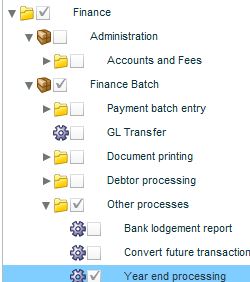
The following security must be configured to give access to perform period end processing.
finance.financeBatch.otherProcesses.yearEnd
1
Navigate to Finance > Finance Batch.
Result: The Payment Batch Entry tab displays.
2
Click Other Processes > Year End.
Result: The Enter Year End Date window displays.
 If some GL transactions are outstanding, a message displays, ‘Some GL transactions are outstanding. Year end cannot proceed.’ Click OK. See Manage General Ledger transfer batches
3
Type the date before which transactions are to be selected, in DD/MM/YYYY format.
4
Click Save.
Result: The system checks to see if it can change the Year End system parameters based on the date specified and if successful Financial Year Start Date (YRST) will be updated to one day more than the year end date entered and Last Year End Reset (RESET) will be updated to the year end date entered.
Next Step
After performing the year end processing, you can continue processing for the next year.